
A trip planner for the places GPS forgets
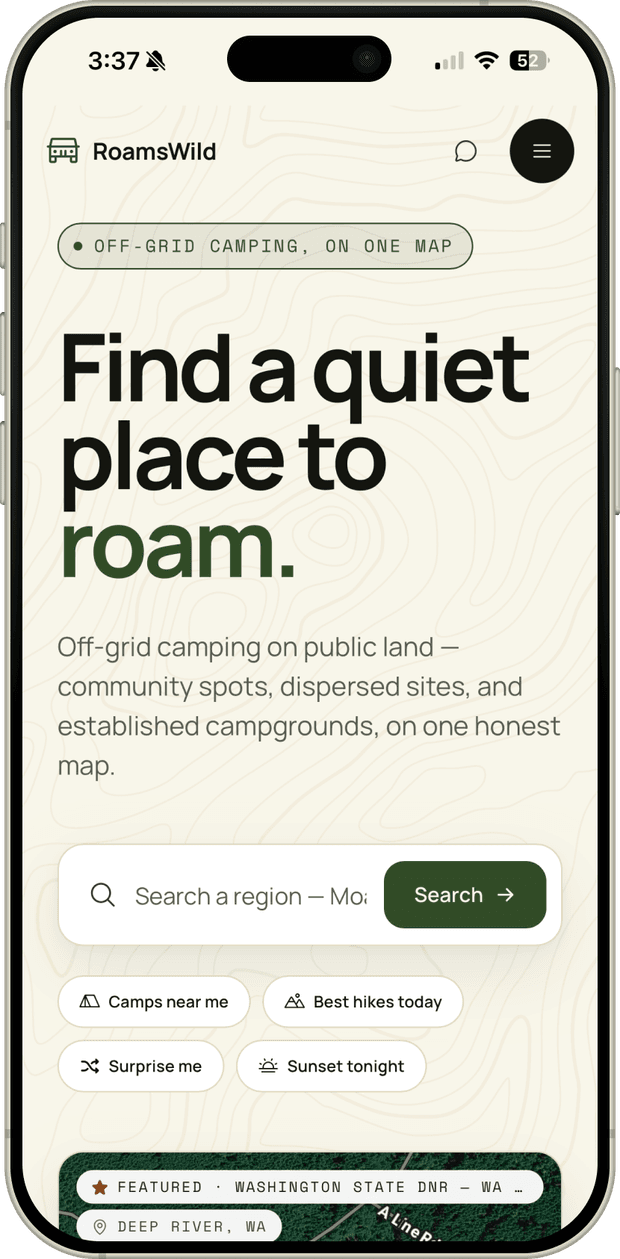
A trip planner for road-based travel on US public lands. Built solo. Real itineraries from a soft prompt like "4 days in Southern Utah, no 4WD."
RoamsWild
Public-land data is scattered across government and user-generated systems like USGS, USFS, BLM, NPS, and OSM, and the sources don't talk to each other. Most apps source dispersed camp spots from user-submitted pins that are often outdated, overcrowded, vague, or on private land.
RoamsWild was built because I needed it. Spending months at a time traveling on the road when not everything is planned leads to a lot of time spent on five or more apps trying to discover new places to explore, where to camp legally, and as a landscape photographer, chasing the perfect camp spot or hiking trail never ends. Decision fatigue happens fast and often.
Visit RoamsWild
Project Overview
Objective
Most outdoor apps treat data as decoration or trust "verified" crowdsourced pins as ground truth. I wanted to do the opposite: every recommendation traceable to a real geometric or legal fact, a sun vector, a public-land polygon, or a road track, with crowd data and LLM/AI input as a secondary signal at most.
This case study walks through the product decisions, the design system that emerged, where AI helped and where it didn't, and the geospatial work underneath that led to a fully functional product that uses over a dozen external data services, and a database that holds tens of thousands of public-land ownership polygons, road segments, and derived camp spots.
Role
Solo designer & builder: product strategy, design system, UX/UI, data architecture, and the Python terrain service.
Tools Used
Key Skills
AI as a build partner
Using Claude Code as a tool for a solo full-stack build, with markdown context files as the working memory.
Geospatial Architecture
Unifying fragmented public-land data with PostGIS, GDAL pipelines, USGS 3DEP elevation tiles, and real-time solar math in production.
Self-initiated product strategy
Defining who the users are and the problems they face, scoping what the product will and won't do, and owning it through UX, design, and a realistic technical roadmap.
Markdown-driven AI workflows
Markdown-driven development (PLAN.md, CLAUDE.md, DESIGN.md) for AI context efficiency, with targeted agent skills to audit engineering and database-schema gaps.
The Problem
Multiple sources, no agreement
RoamsWild serves two travelers who are usually the same person. The overlander asks 'can my rig actually get there, and is it legal to camp?' The photographer asks 'will the light be any good when I arrive?' Underneath both is one question: can I trust this enough to drive hours off-grid to it?
Public-land data is fragmented and the sources don't talk to each other, so apps bridge the gap with crowdsourced pins that are often outdated or on private land. The result for anyone actually out there is four or five apps open at once, heavy cognitive load, and decision fatigue.
I am on the road constantly and mostly camp on public land for overlanding and offroading trips, so I have hit every one of these failures in the field: at dusk, with no signal, miles down a road with nowhere to camp. That is the bar this had to clear.
Who it's for
Outdoor Travel
Road-based exploration across public lands, national forests, and BLM areas.
Dispersed Camping
Free camping on public land, which requires knowledge of access, terrain, and regulations.
Landscape Photography
Finding optimal lighting, terrain features, and weather conditions for capturing compelling outdoor scenes.
Competitor teardown
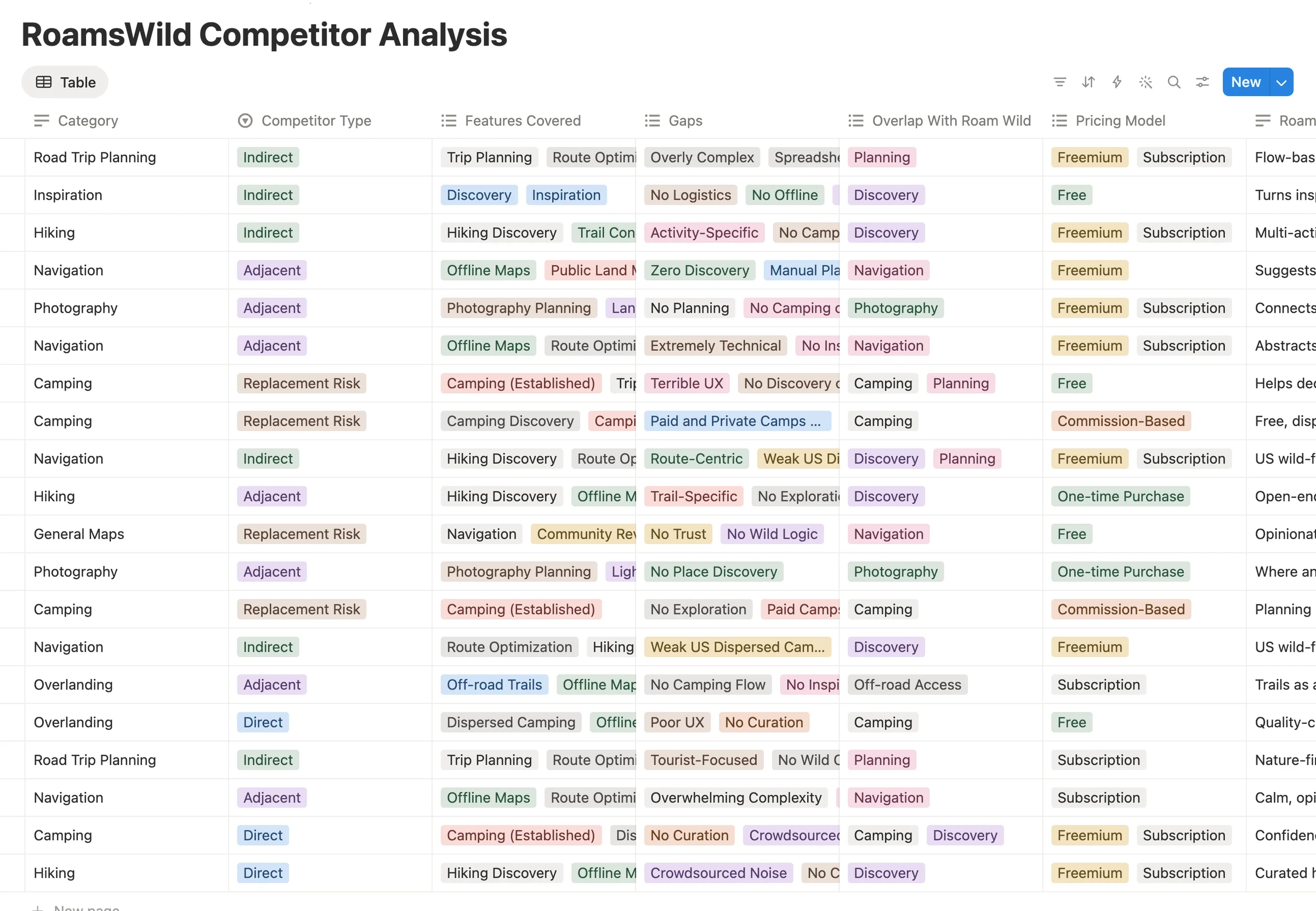
The biggest gaps showed up in the same places across the set: crowdsourced noise with no curation, no wild-camping logic anchored to legal land ownership, photography and light context missing entirely, and discovery, planning, and navigation siloed into separate apps that never connect into a real trip.
Field research
Research from the road
The research for RoamsWild wasn't official. It happened with friends and fellow travelers around campfires, at pull-offs at the end of forest roads. Over more than five years of nomadic travel and time spent with other overlanders, travelers, and photographers, the same challenges and patterns kept repeating: piecing together four or five apps to find camping, scout new landscape highlights, and time golden hour. The problems are ones I share and constantly hear about while on the road.
“Life on the road is anything but easy. Constant decisions about planning a route, what to do, and where to camp can be a real drain on the fun and magic of vehicle-based travel.”
Drew Hope, Overlander
The product, in motion
A look around the product
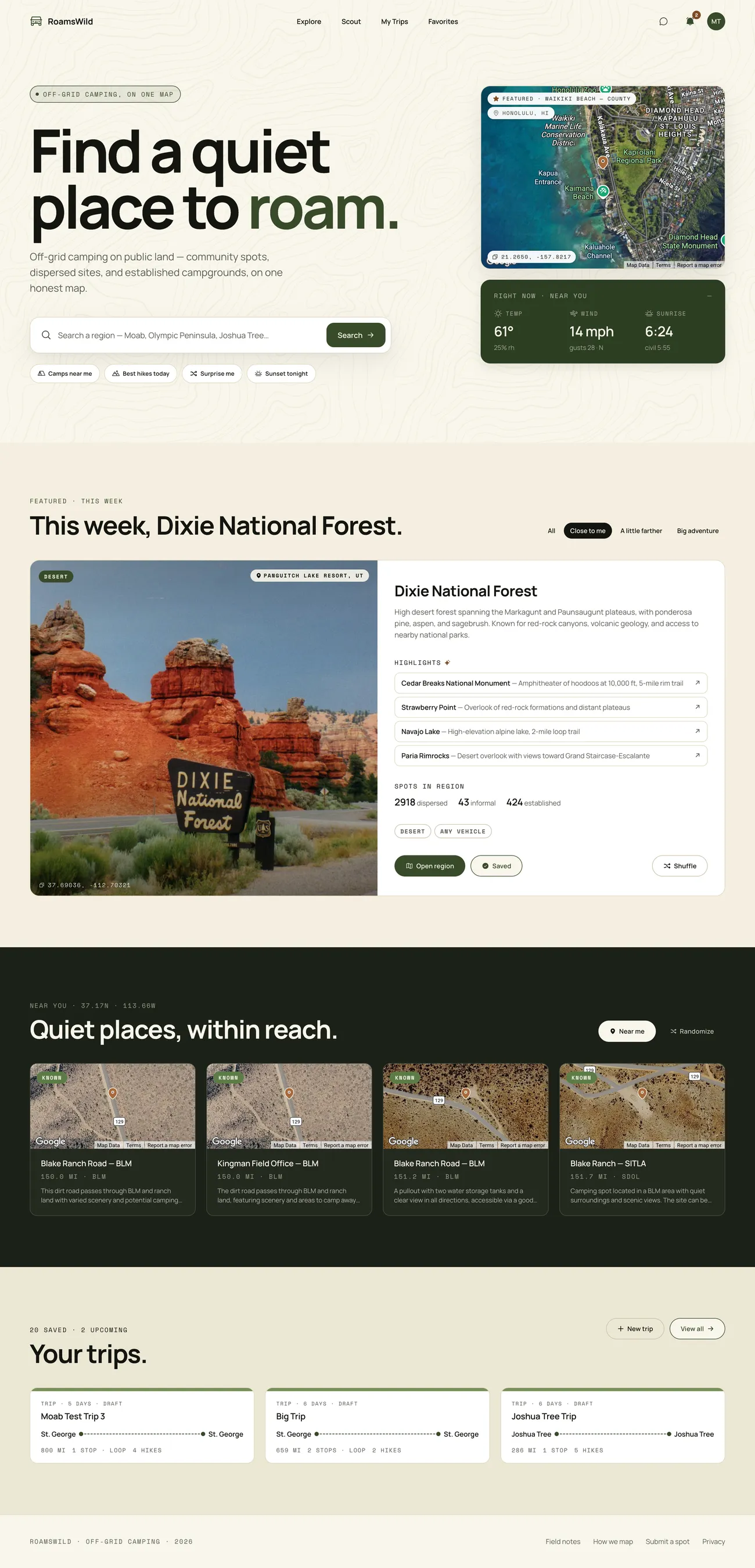
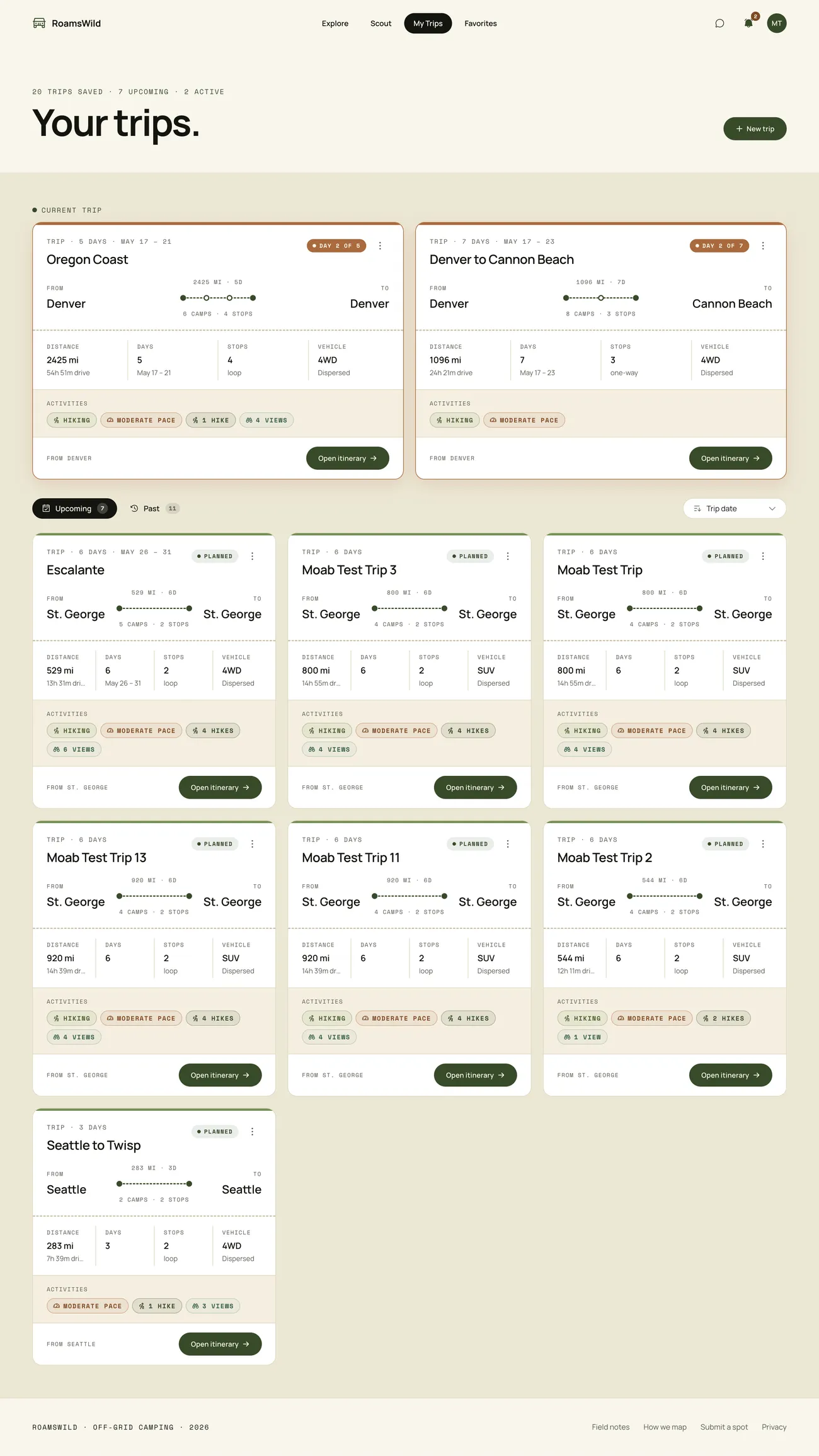
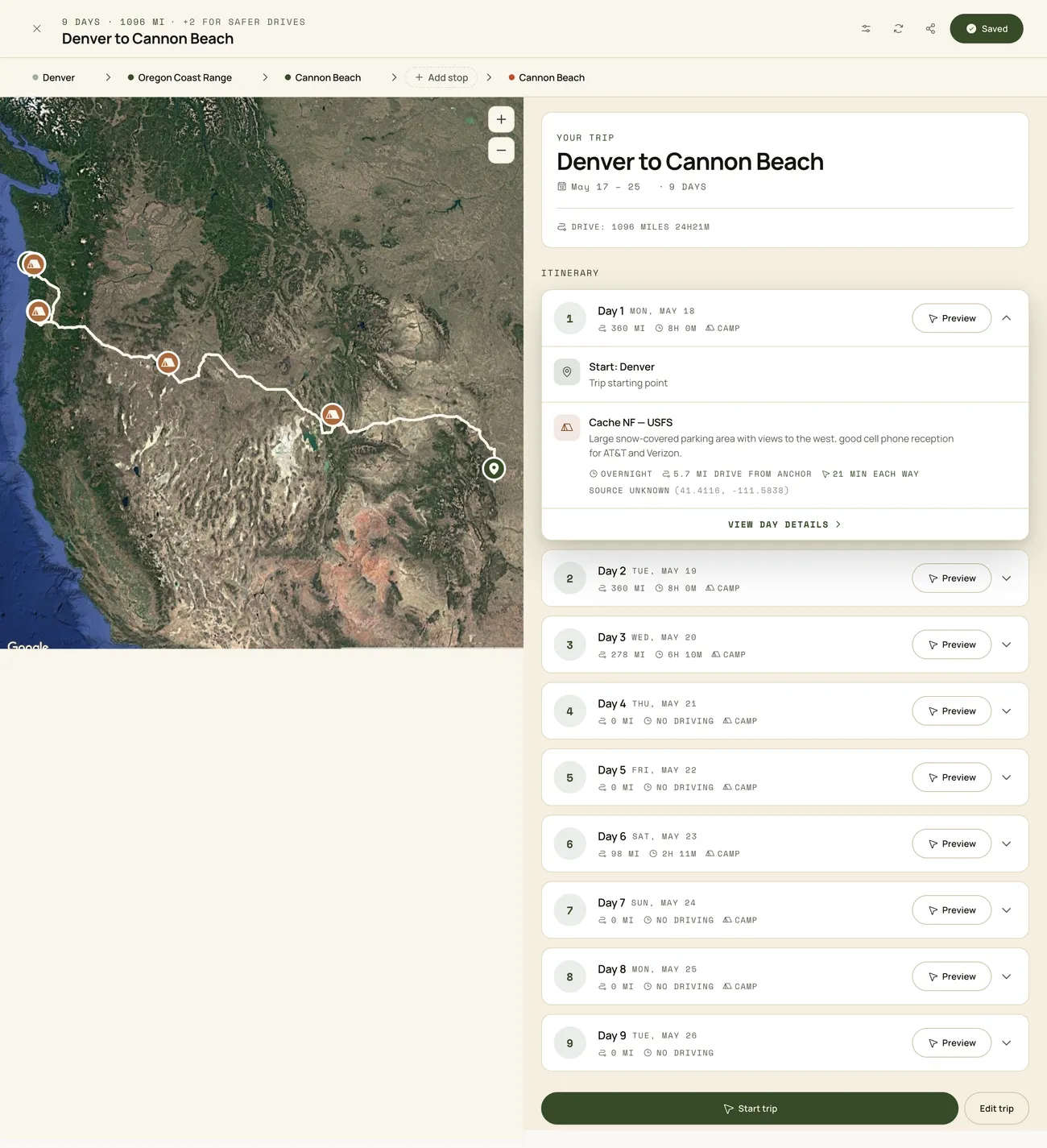
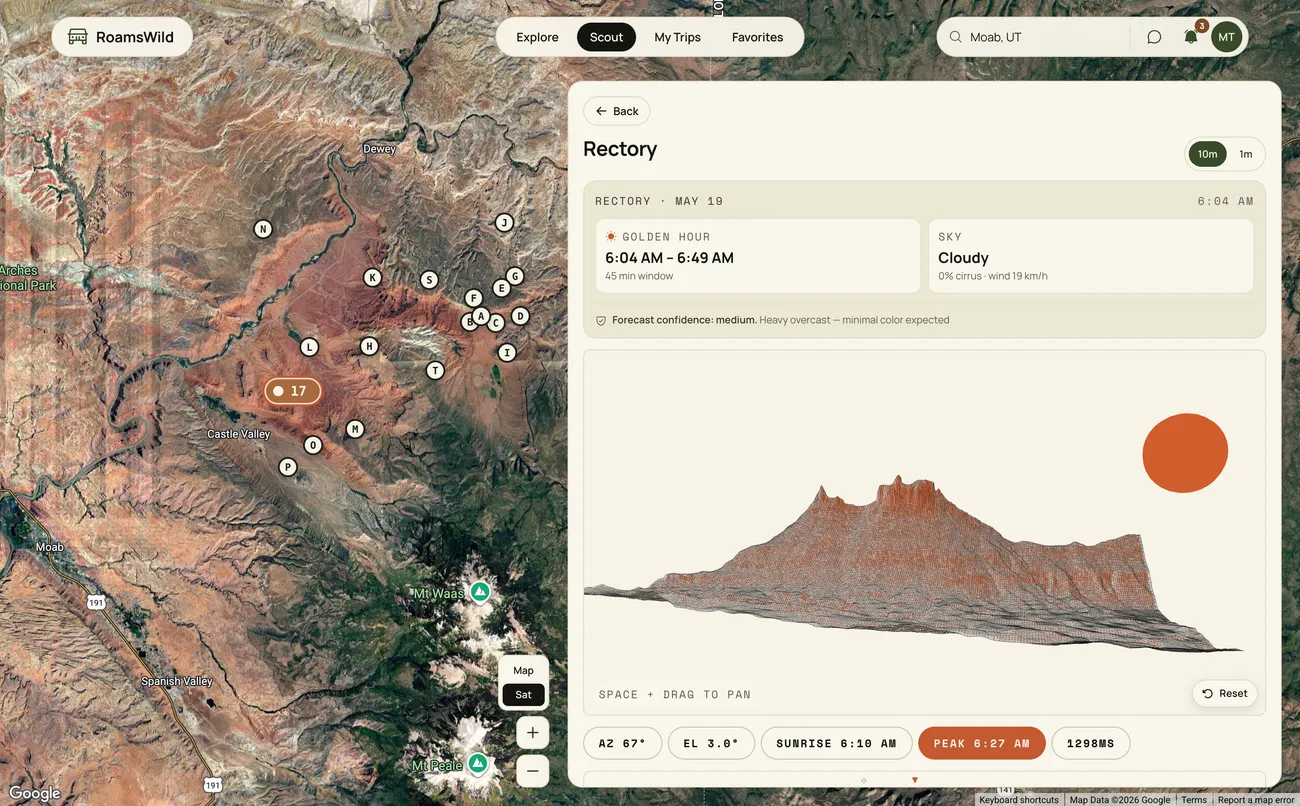
Working with AI
How I used AI
AI did the typing. I owned the judgment. The build settled into a short loop with a hard rule about which moves were mine and which were the agent's.
The loop
I set intent and context
The what lived in markdown before the agent wrote anything. PLAN.md for architecture and terrain math, PRODUCT.md for users and voice, CLAUDE.md for guardrails that never change. Each prompt pointed the agent at the relevant files, scoped to one thing.
The agent writes the code
A polygon rule into SQL, an OSM tag taxonomy into normalized columns, a panel wired to an endpoint. Anywhere the shape was decided and the typing was the cost.
I judge it, and log what's wrong
Flag the edge spots or delete them. Half-mile private-road buffer or a quarter. Field notebook or outdoor retailer. The agent could build either and couldn't tell me which was right. Whatever stayed broken went into TODO.md with the reason, so the loop never lost it silently.



Where it broke
The model lies differently than the data does
HallucinationsThe model invented table names and function signatures. The data lied too: OSM contributors disagree on surface tags, PAD-US polygons shift year over year. Surfacing the raw data early caught most of it.
Confident at 200 lines, useless at 2,600
Context ceilingPhoto Scout grew into a 2,606-line monolith with state, terrain math, and the map all tangled. The agent stopped being useful. A refactor (state out of the page, math into a FastAPI service, UI into 500-line panels) cut it to a 218-line page. A discipline win, not an AI win.
It can't see two correct systems combined
Emergent bugsThe worst bugs were where every local piece was correct. An RLS policy on saved_trips recursed through trip_collaborators, fixed with a SECURITY DEFINER function. A classifier labeled a paved campground '4WD required' because OSM never tagged its interior path as a road. Nothing the model sees is wrong.
Translating Geography into Code
System Architecture
RoamsWild was as much a product problem as it was a data and architecture problem. Every technical decision underneath, what to ingest, what to normalize, what to flag as low-confidence, became a product decision about how much certainty to project on the surface. It's nuanced and layered all the way through.
Each pillar started as a clean abstraction (a polygon, a graph, a raster) and ended as a much messier problem about how the source data lies, and a product call about how honest to be with the user about it.
16
External services
21
Edge Functions
40K+
Candidates per query
~150ms
Photo Scout query, from ~50s
Under The Hood
The web app talks to two things directly: Supabase and Google Maps. Supabase's Postgres and PostGIS hold all the real data, and around twenty Edge Functions act as the serverless API, keeping keys server-side and fanning out to OSM, routing, recreation, weather, AI, and email APIs behind proxy functions. A separate FastAPI terrain service handles the Photo Scout terrain math. One platform gotcha worth naming: h3_postgis runs cleanly on a local Postgres image but Supabase's managed Postgres won't ship the extension, so H3 cells get computed in Python instead, the kind of thing you only learn by trying to move the local prototype into the cloud.
Supabase core
Terrain API
Google Maps Platform
OSM & routing
Recreation
Weather
Enrichment & AI
01
a polygon
Public land ownership
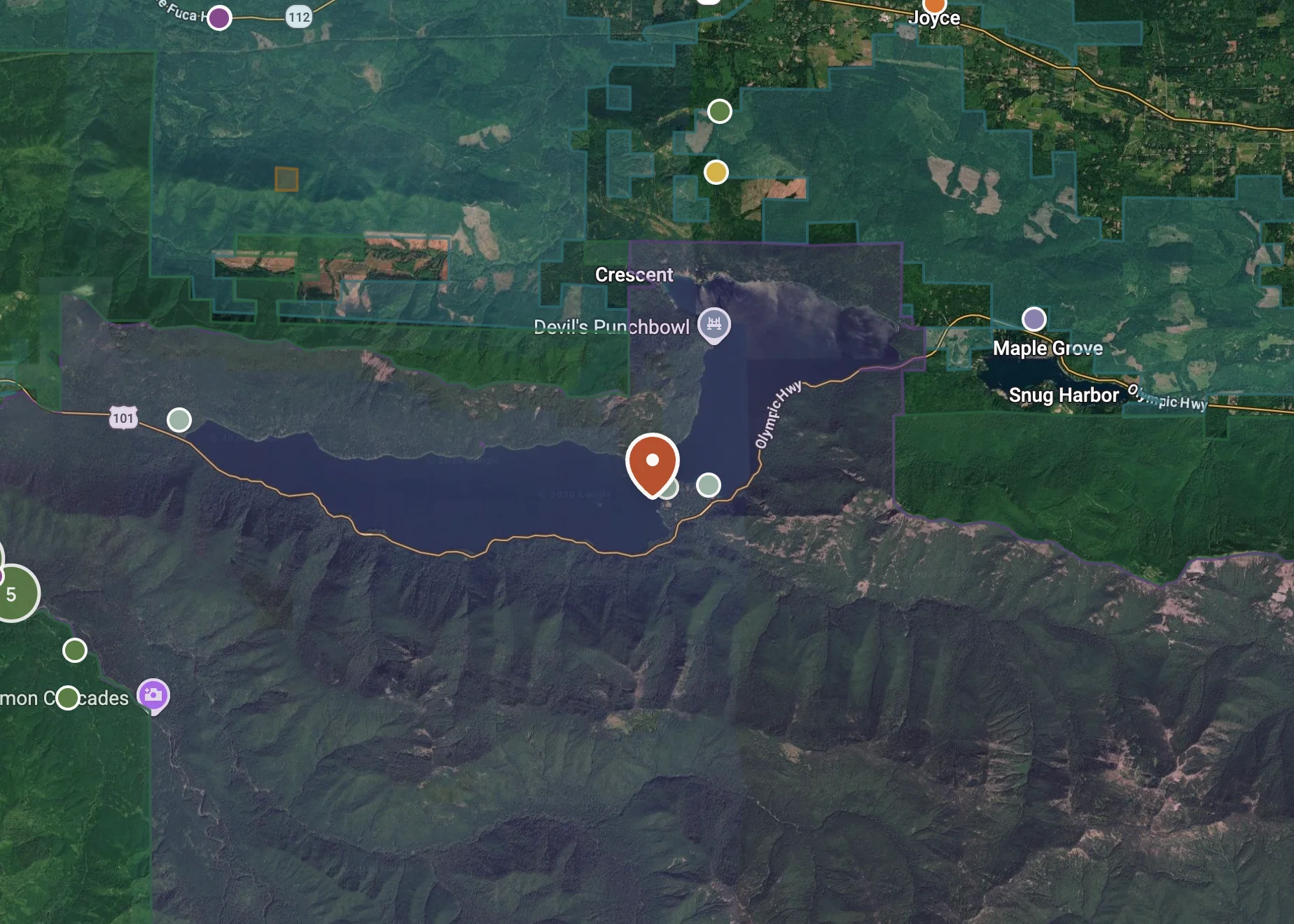
Boundaries come from PAD-US, a USGS aggregate of hundreds of federal, state, and tribal sources at uneven accuracy. A polygon labeled "BLM" can contain a private 1908 mining inholding; a spot might fall near or right outside the ownership boundary, creating confusion on camping legality. Camping rules change between states, and trust land may or may not allow camping. A deep-research session pulled rules and regulations for trust land, surfaced on a state-by-state basis.
The tradeoff
PAD-US misses by ~30m at boundaries. Rather than delete edge spots, I flag distance-to-boundary and an 'outside polygon' signal behind a deliberately conservative 50m buffer.
02
a graph
Roads and accessibility
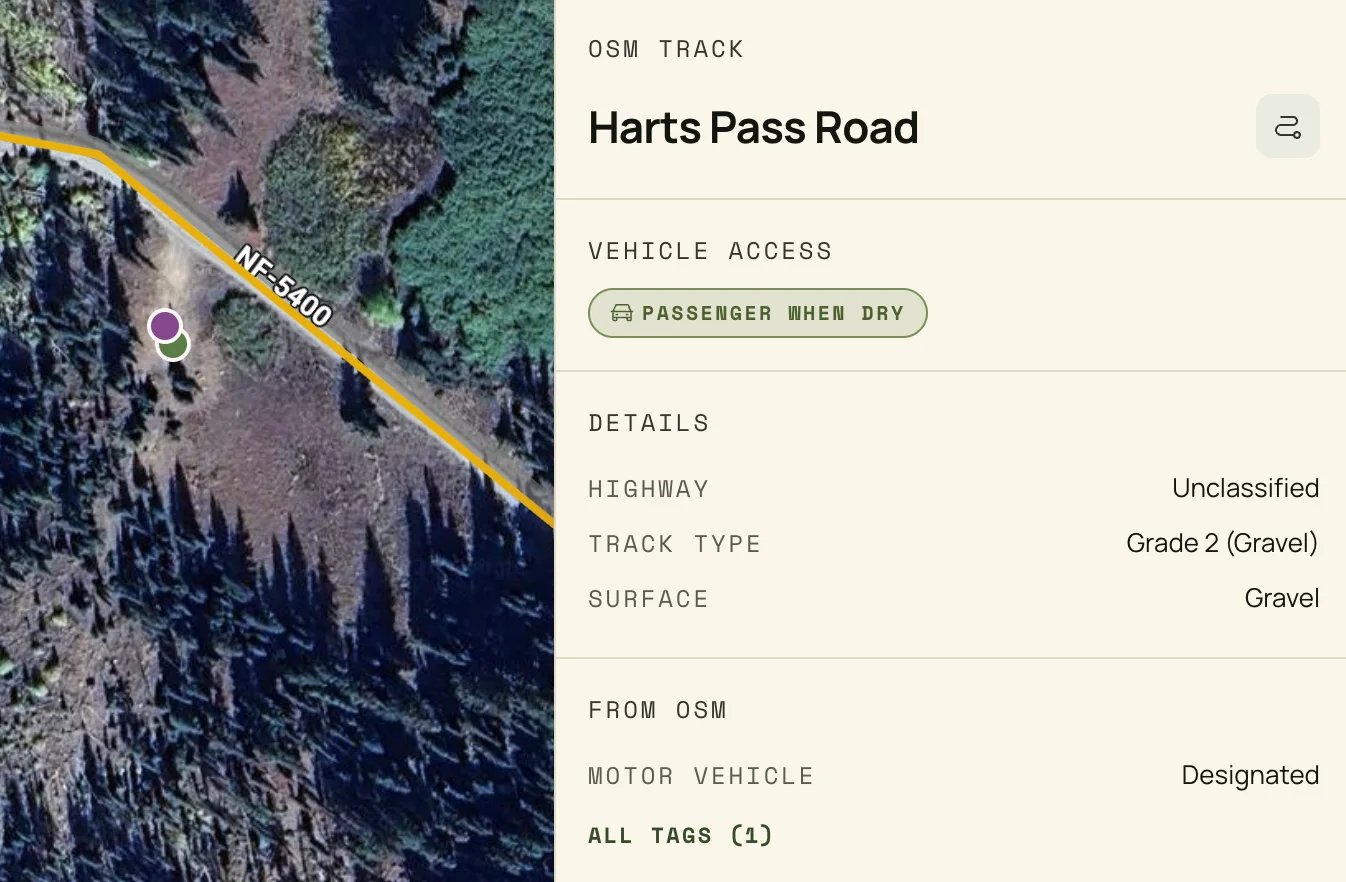
The road layer pulls every drivable way from OpenStreetMap via Overpass, stored as PostGIS lines. Each segment carries OSM tracktype (grade 1 paved to grade 5 4WD) and a normalized vehicle-access class the planner treats as a hard constraint: say 'no 4WD' and it won't show you a spot that needs one.
Roads also unlock spot derivation. A true dead-end on public land is a strong prior for a real dispersed site, the pull-off at the end of a forest road that's in no registry.
The tradeoff
The first pass was too generous: ranger-station driveways, gated mining roads, private spurs. The fix layered public-land containment plus a half-mile buffer around private-access roads. It costs a few legitimate spots, but failing closed beats failing confidently.
03
a raster
Terrain (DEM analysis)
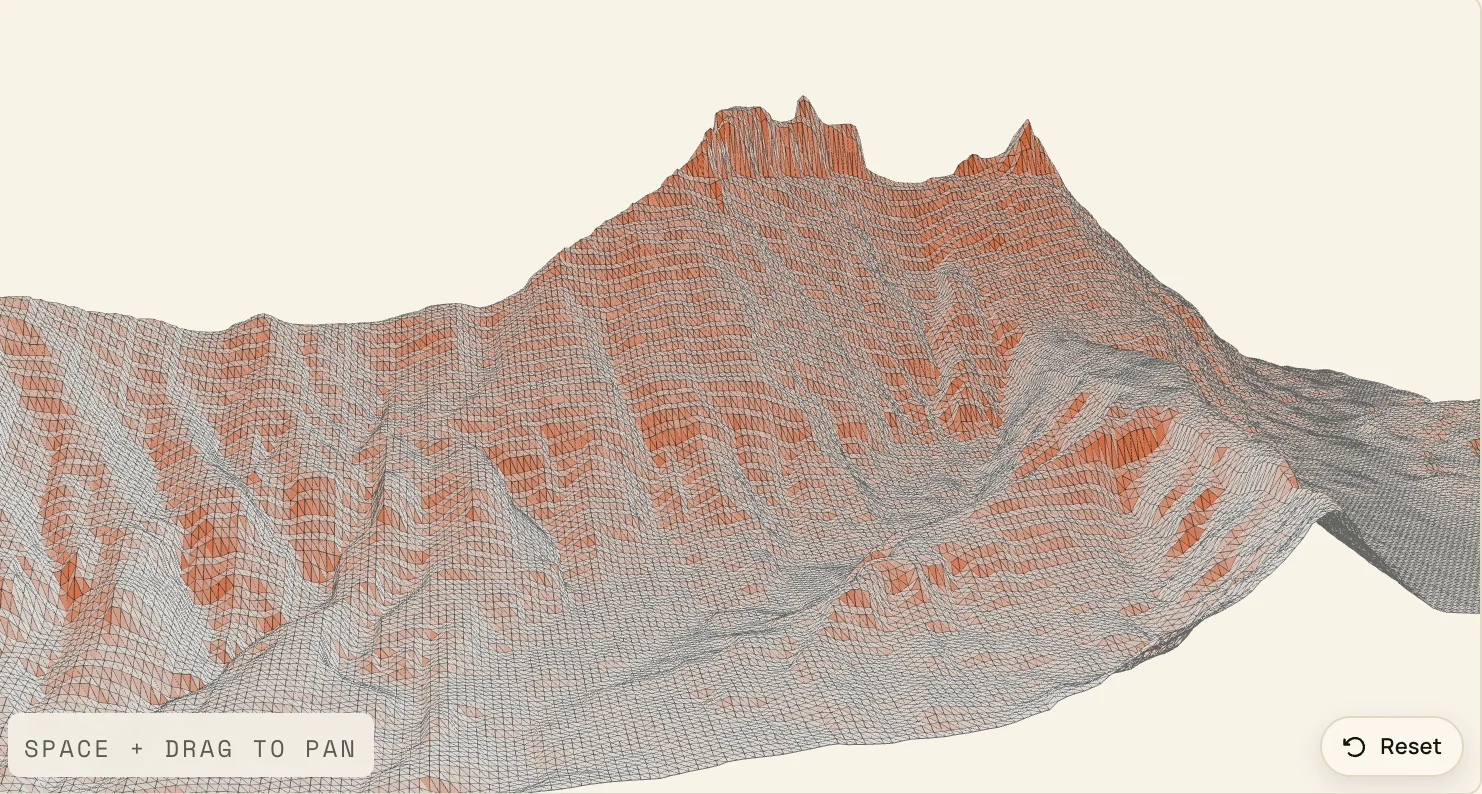
Built on USGS 3DEP tiles loaded as chunked PostGIS rasters. Sun position is computed from first principles, line of sight is raycast and corrected for Earth curvature and refraction, and every render shows the actual face the sun will light, not a guess. Using OSM, the app surfaces access points with line of sight and previews the view from each one.
The tradeoff
The first version was technically and mathematically complicated and photographically wrong. The math became too layered and nuanced while working through a proof of concept, and had to be completely scrapped. Being able to move fast does not always equal success.
My Solutions
Designing for trust and speed
This is where the design did the work. The thing being designed was trust in messy, safety-critical data, so the visual calls had to come from someone who had been in the field, not from a model optimizing for a clean screen.
The move the agent never got to make
After the first prototype I stopped building features for two weeks and built the design system. The product couldn't look like default SaaS, and it couldn't look like outdoor-retail marketing. The agent could build either; it couldn't tell me which the data deserved.
01
Ideation
Before any screens, the product ideas came through a messy Procreate session, sketching through and writing out ideas. The reality of building with AI is that often something that works is better to start with than a pretty screen, so I didn't worry about visual design or being pixel-perfect until I knew I had something worth building.
02
Initial screens, then a band-aid
The first build was a proof of concept: get something working end to end with AI, then see what the interface actually needed.
Proof of concept
The first generation was haphazard, born from a vague prompt in Lovable. I wasn't sure yet what I could accomplish using AI as a process tool, but for an initial output with so little direction it was impressive, and fast.
A band-aid on the UI
Working backward from a messy, inconsistent UI was really just a band-aid, but it made things a little better as I worked through a proof of concept for some early ideas.
Color experiments that missed
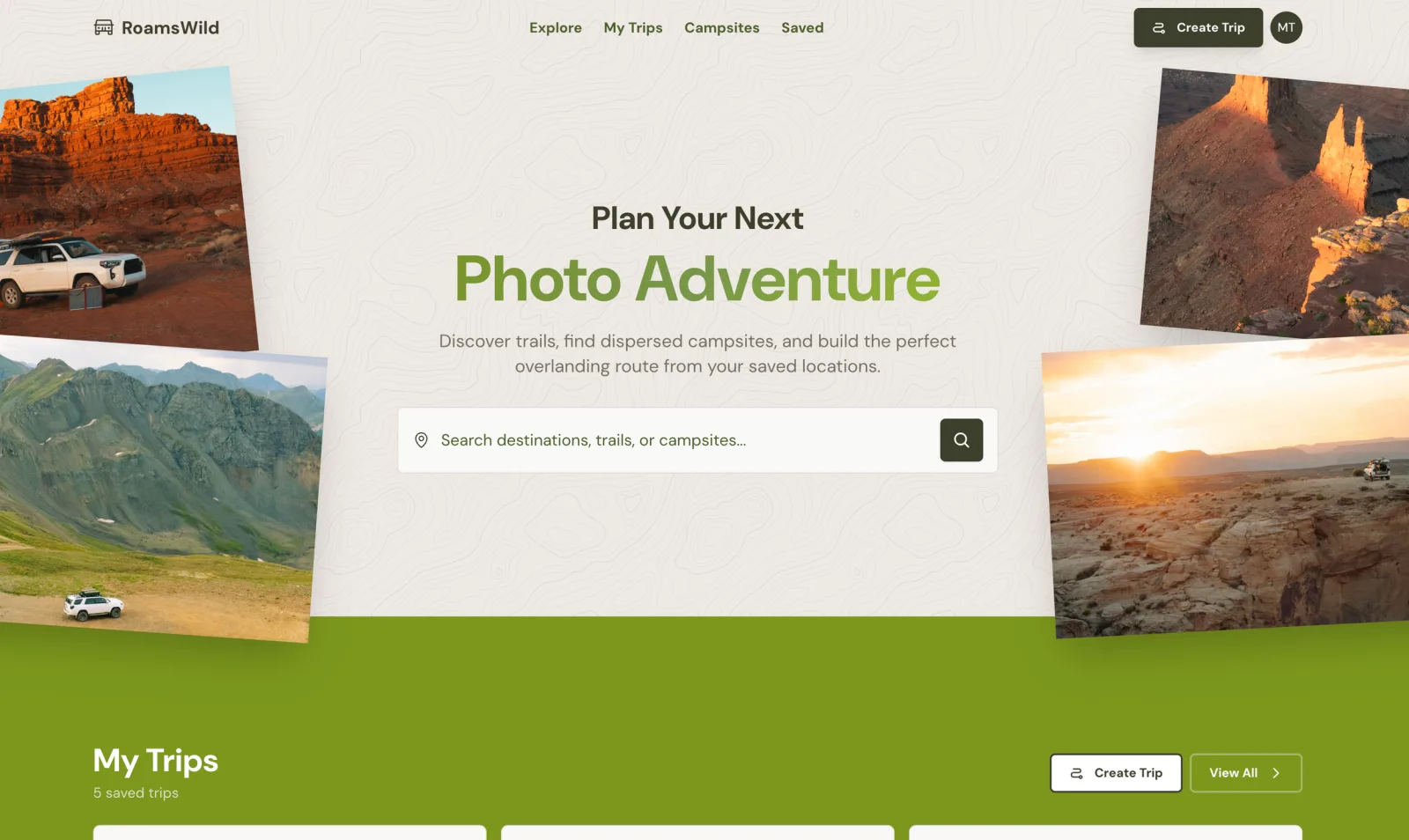
Started playing with design more, but mostly focused on a consistent UI and a style guide with colors for light and dark themes. The look and color just weren't it, and didn't fit the general feel of the adventure app I was going for.
03
Setting a solid foundation: Pine + Paper
Once I had a fully viable app working, the design needed to evolve to scale, fit the general voice, and help the app instill the trust its users need.

Settled on a final color scheme and design direction, using DESIGN.md to frame it, then defined components and styles in a new style guide for a look aligned with the in-the-field travel and explorer aesthetic.
Pine + Paper is what happened once the focus moved to visual design. The north star became 'The Field Notebook': a warm paper canvas, one ink hand, a primary pine accent, the visual language of the natural settings the users live in rather than a tech landing page. Claude doesn't want to make things consistent or use styled components by default, so that kind of discipline and control had to come from me.
The rules earn their keep in the field. Specific over evocative, so the copy says '38 mi of graded gravel, last 4 mi rutted' instead of 'rough road.' Color is never the only signal, so a drivability tier is also a glyph and a label and stays legible in bright sun on a vehicle screen. The restraint is not minimalism for its own sake; it is the visible contract of the data underneath.
Once the system stabilized, I used the Figma MCP to mirror the live production components back into Figma. The MCP read the running React components and rebuilt them as a structured Pine + Paper library, Tags, Banners, Surfaces, StatCards, trip cards, spot detail panels, and the homepage featured region, so design and code stay in lockstep instead of drifting.
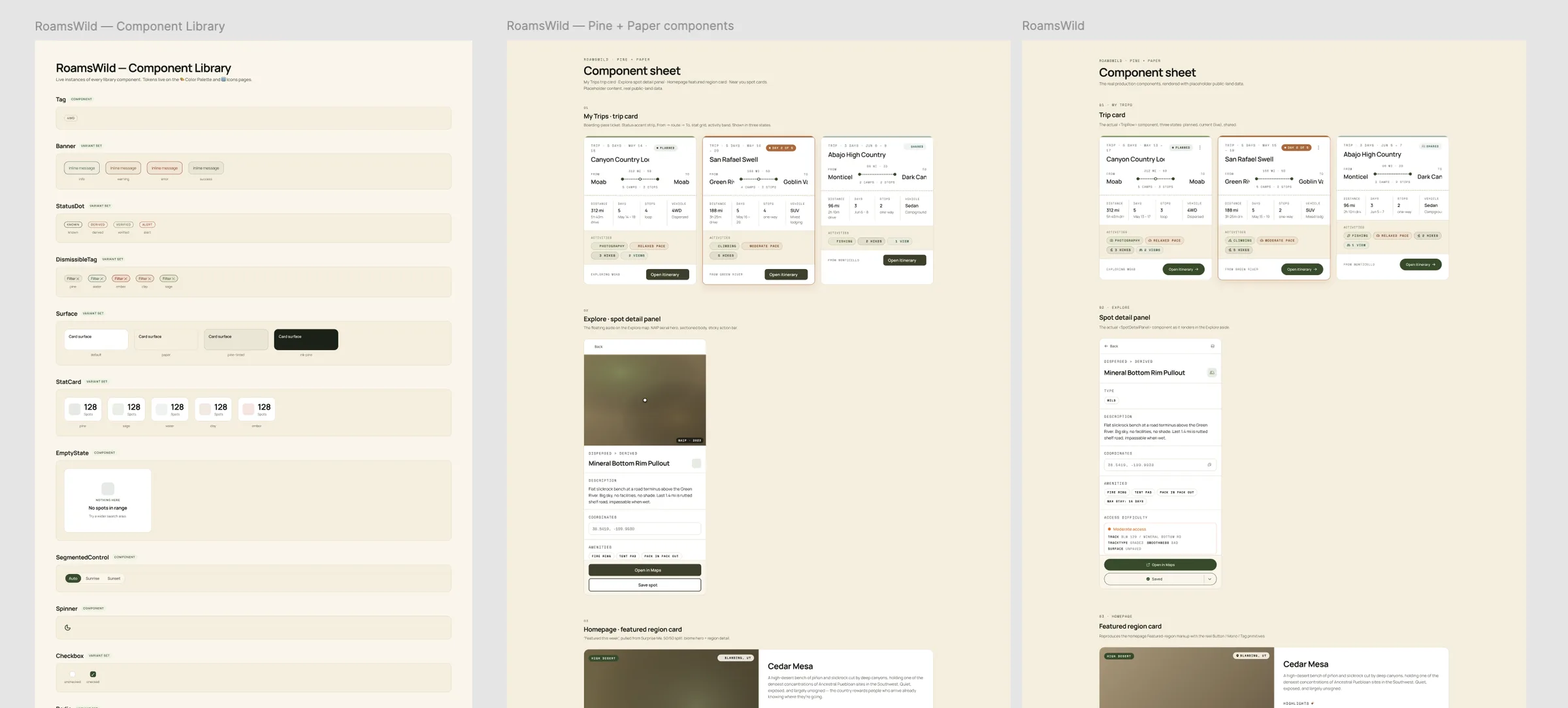
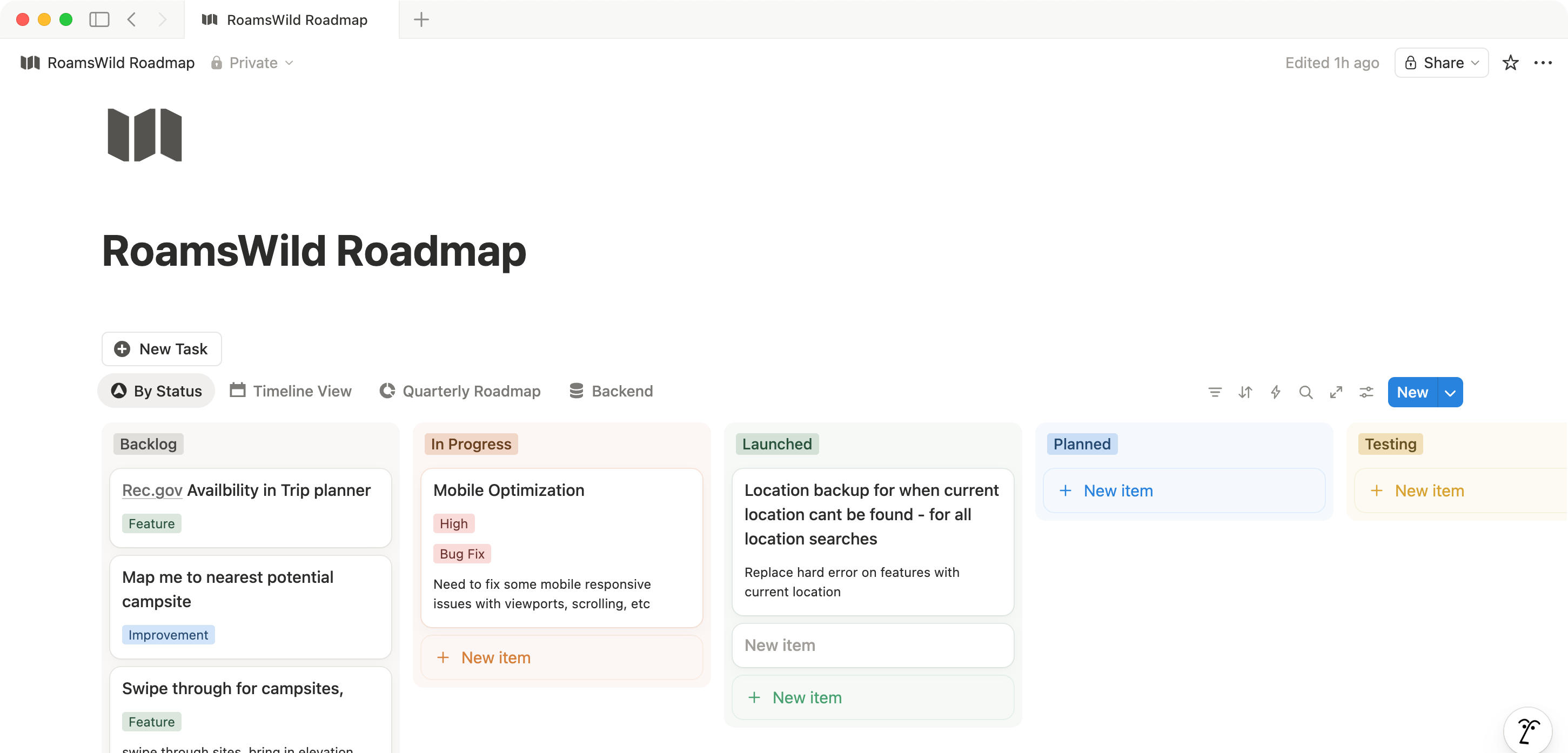
RoamsWild Pine + Paper component library in Figma, generated from the live production components via the Figma MCP.
04
Designing for messy data on the surface
Answer first, evidence below
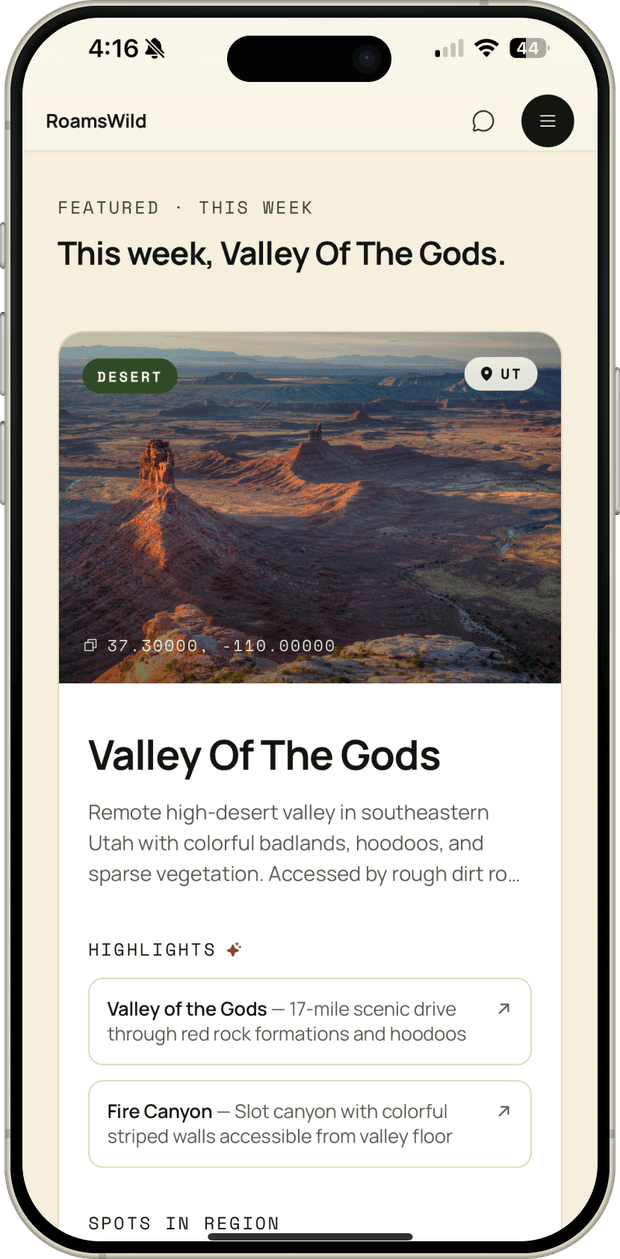
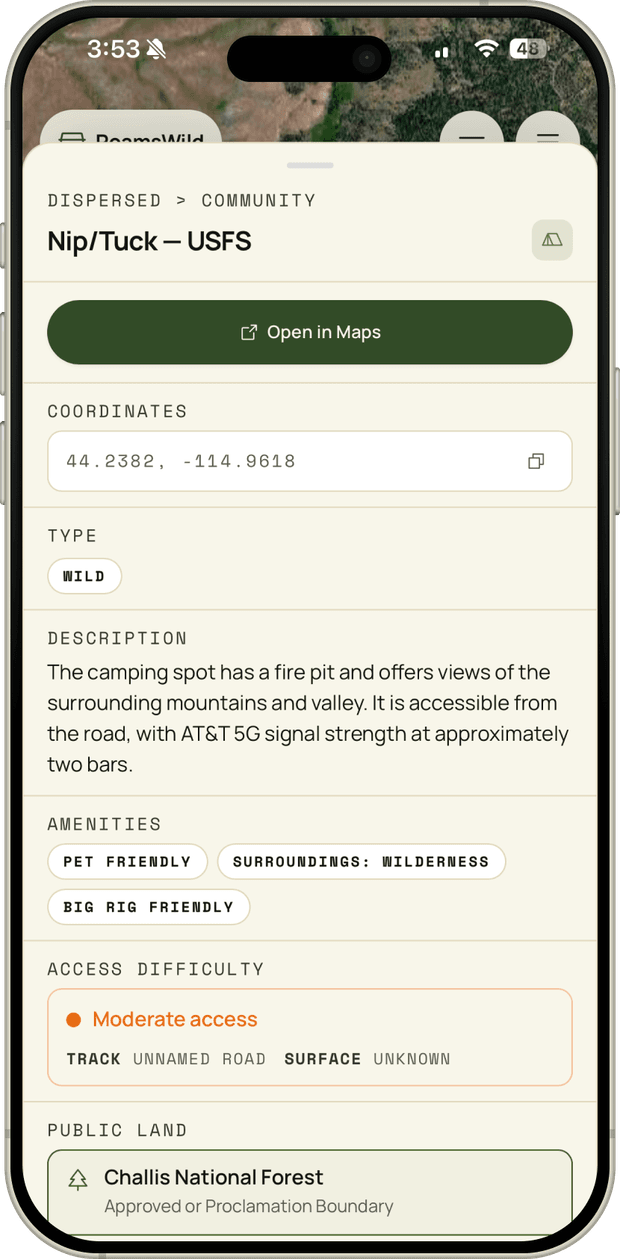
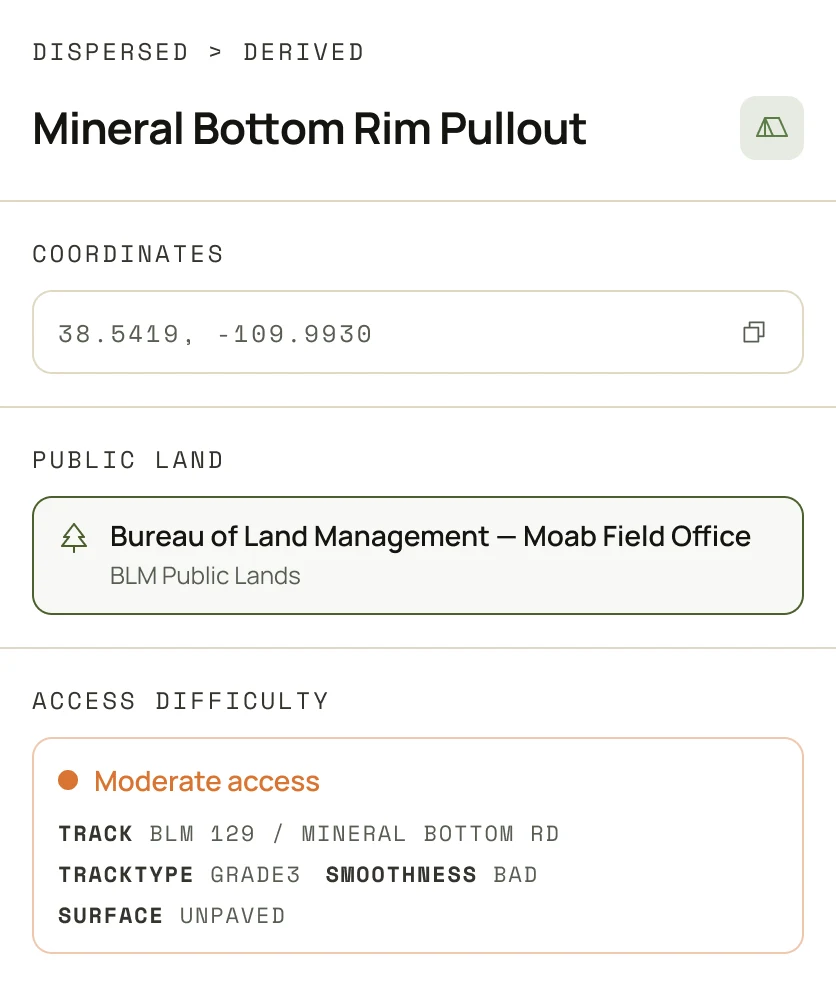
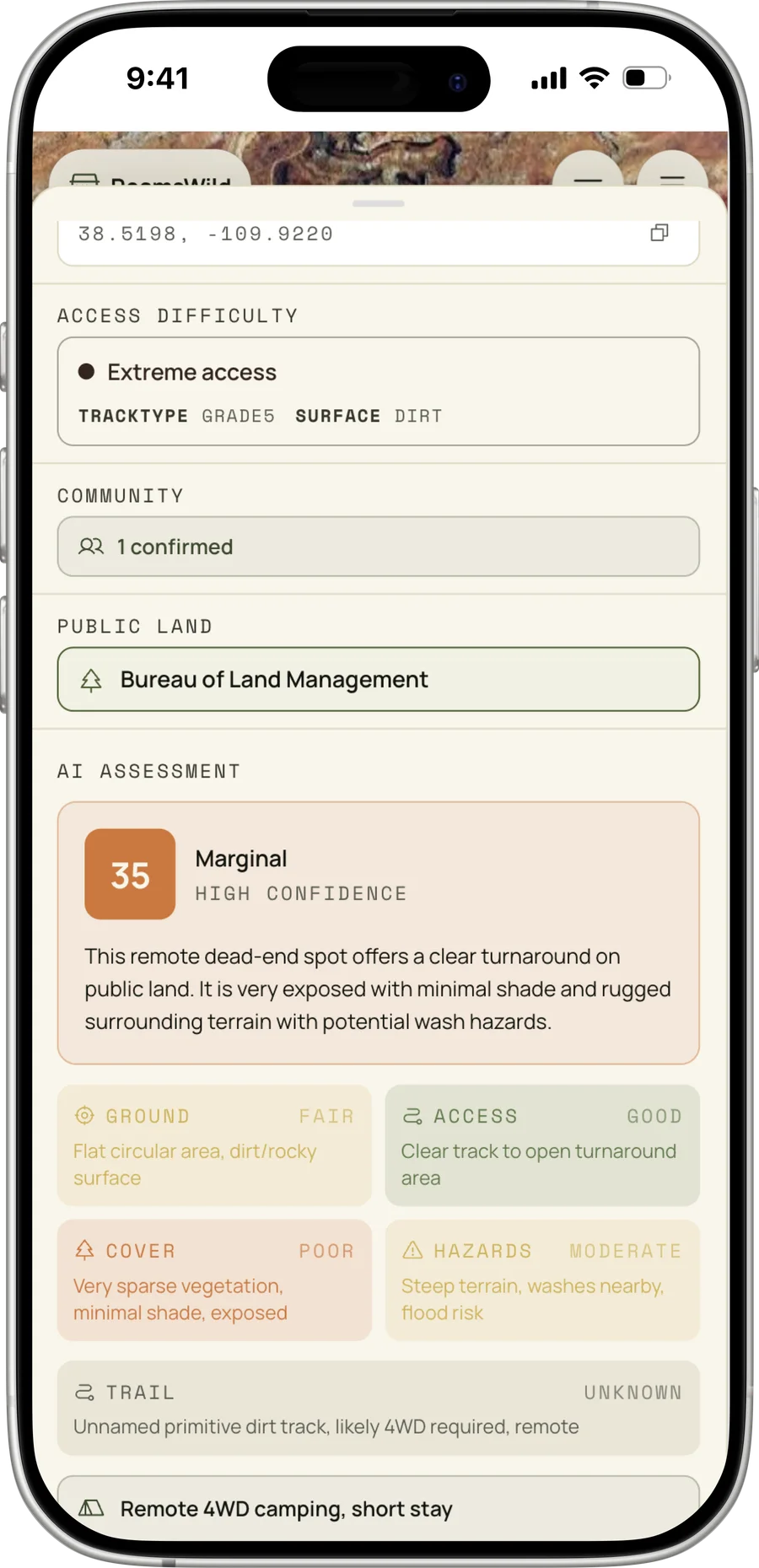
The database is full of uncertainty, so the interface has to be honest about it instead of hiding it behind a clean card. The spot detail pattern leads with the answer, then exposes the evidence: the public-land polygon that contains it, a road-grade chip, a vehicle-constraint chip ('passenger when dry,' '4WD required'), distance to the nearest boundary, and a confidence badge when the underlying data is thin. Success is the right choice looking obvious at a glance, not after twenty minutes of cross-referencing five apps.
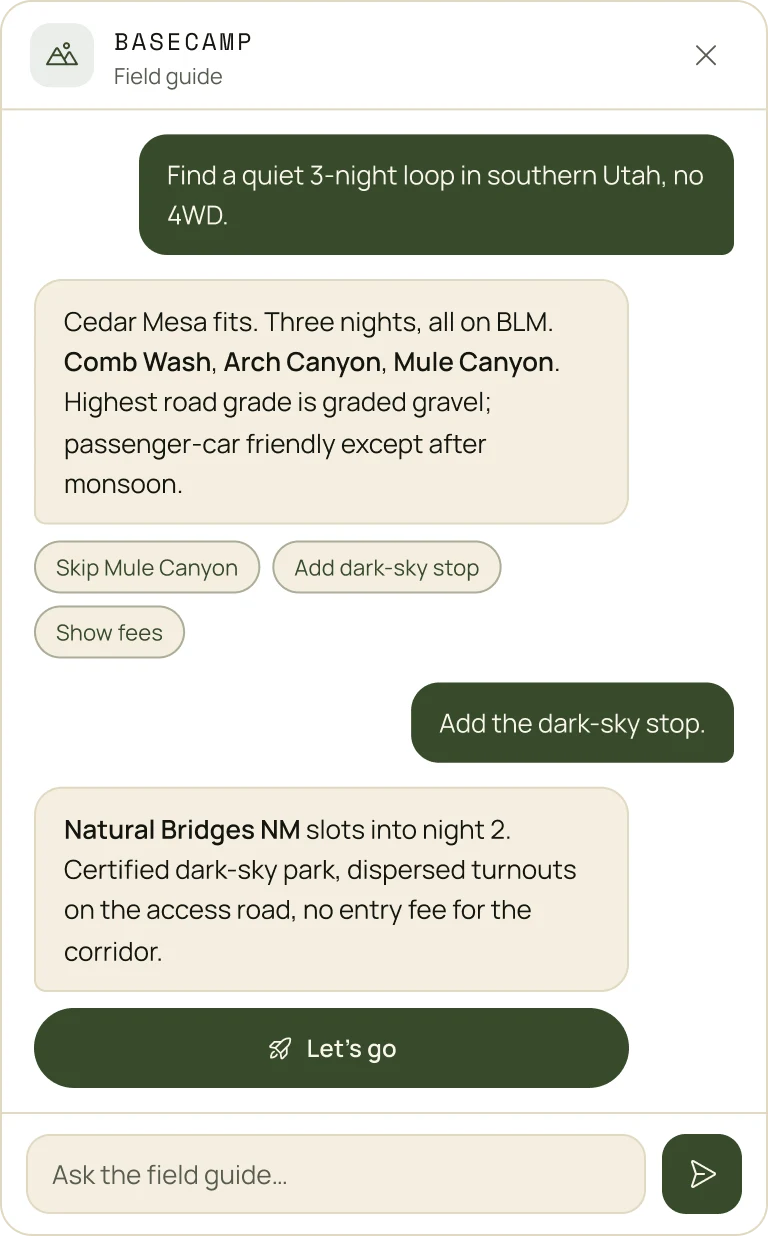
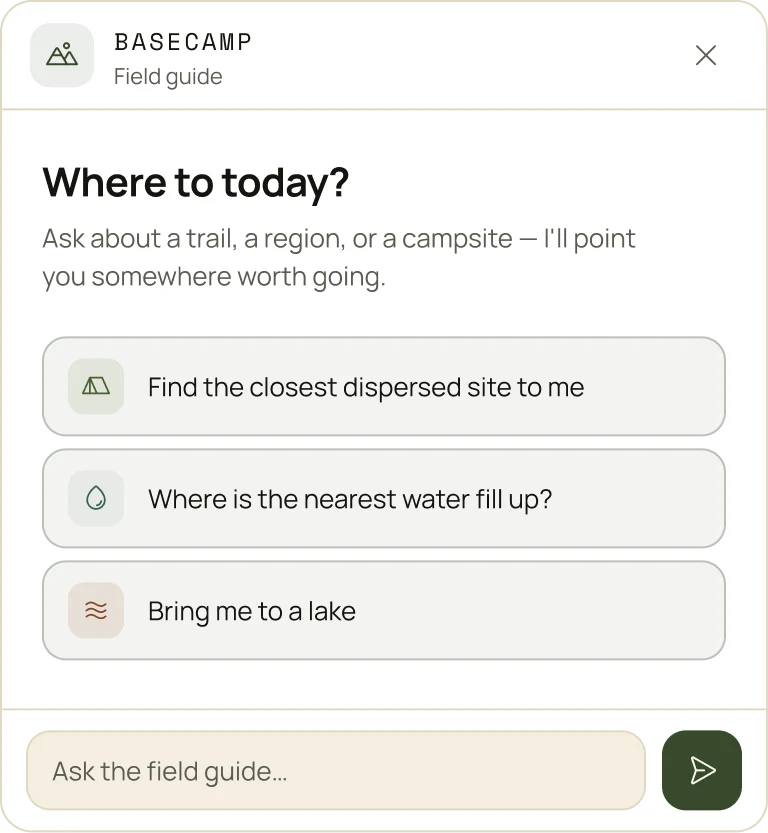
Keeping decision fatigue down at scale
A single region can return thousands of algorithmic candidates. The original problem was cognitive load, so the design goal was the opposite of 'show everything.' Rank hard on real fit, surface a small set of high-confidence options first, collapse the long tail behind intent, and keep the screen calm even when the database underneath is not. The chat assistant takes that further: a soft prompt like 'what's a good hike near me?' or 'where's the nearest water?' returns one or two answers from the same filtered, legality-aware set.
Key Product Experiences
Each surface is a different shape of the same question: which option is actually worth it right now?
Spot Detail
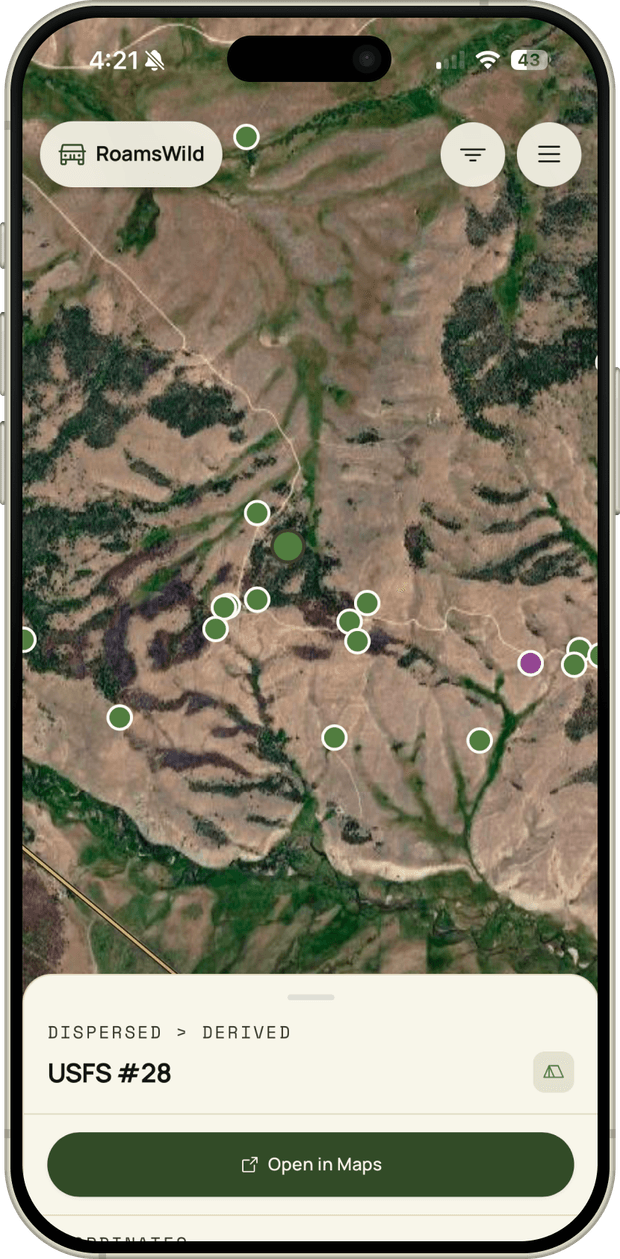
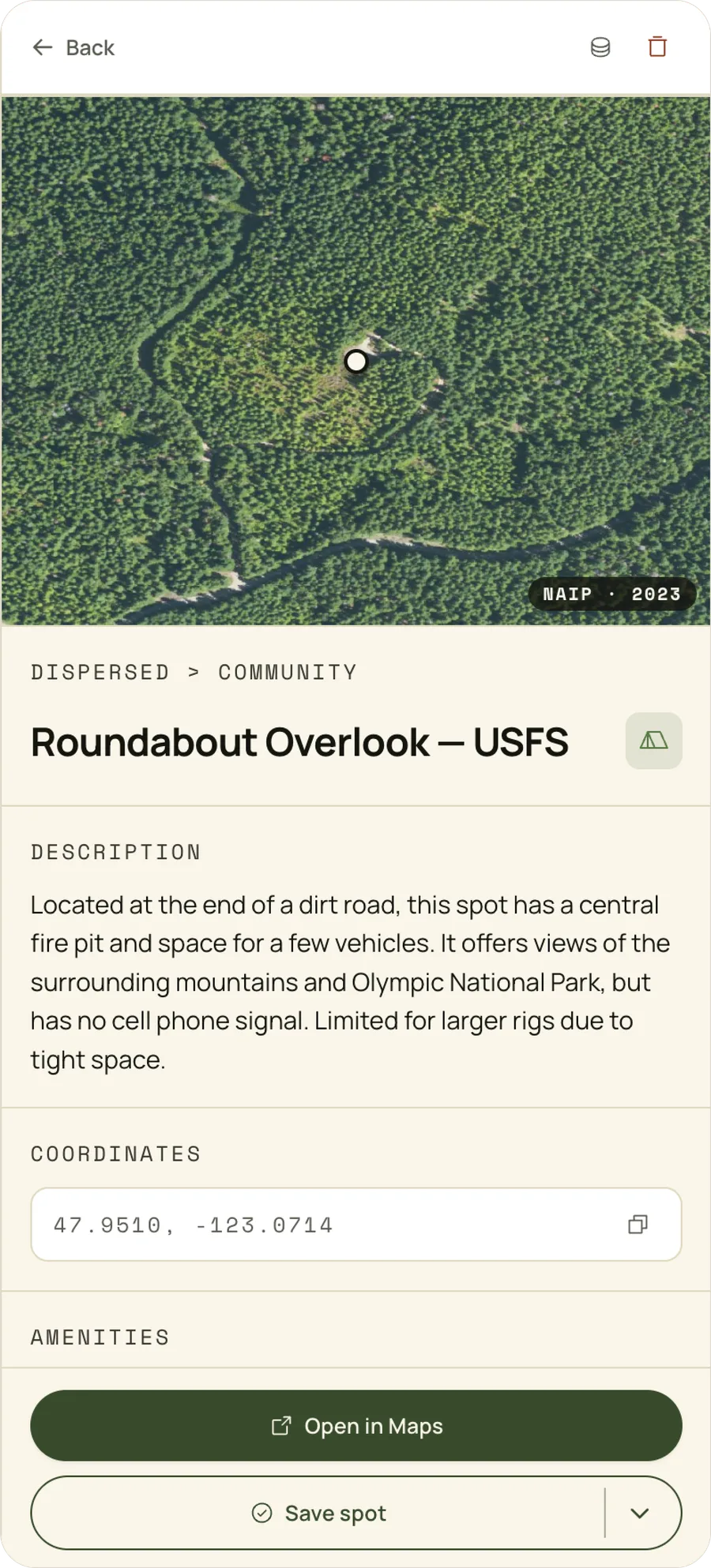
Every camping spot opens to the same verifiable card: a satellite view with the dropped pin, the land manager and type, a plain-language description if it's a community add, exact coordinates with one-tap copy, amenities, and open-in-maps. The data is the product; the interface just presents it honestly.
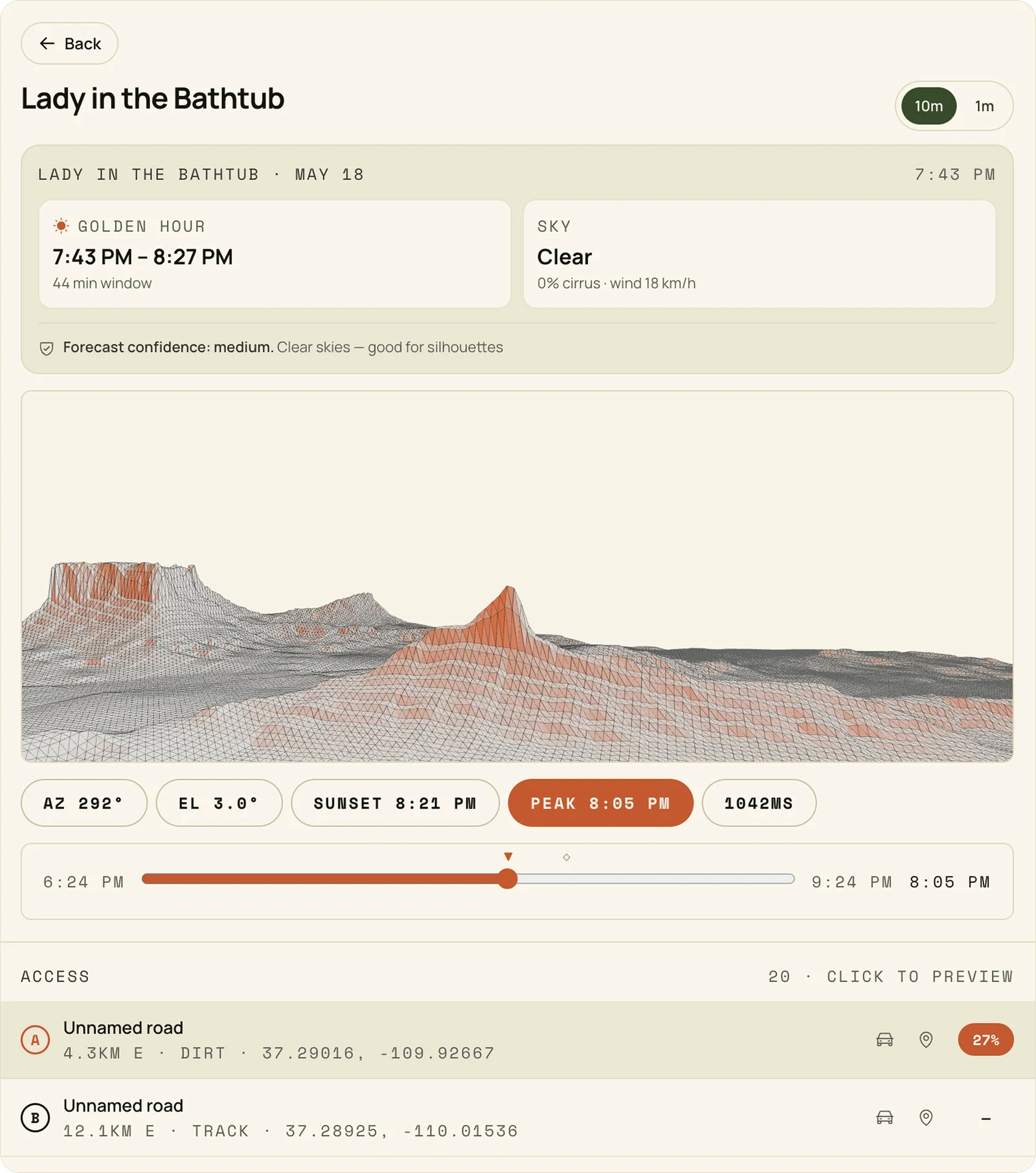
Photo Scout
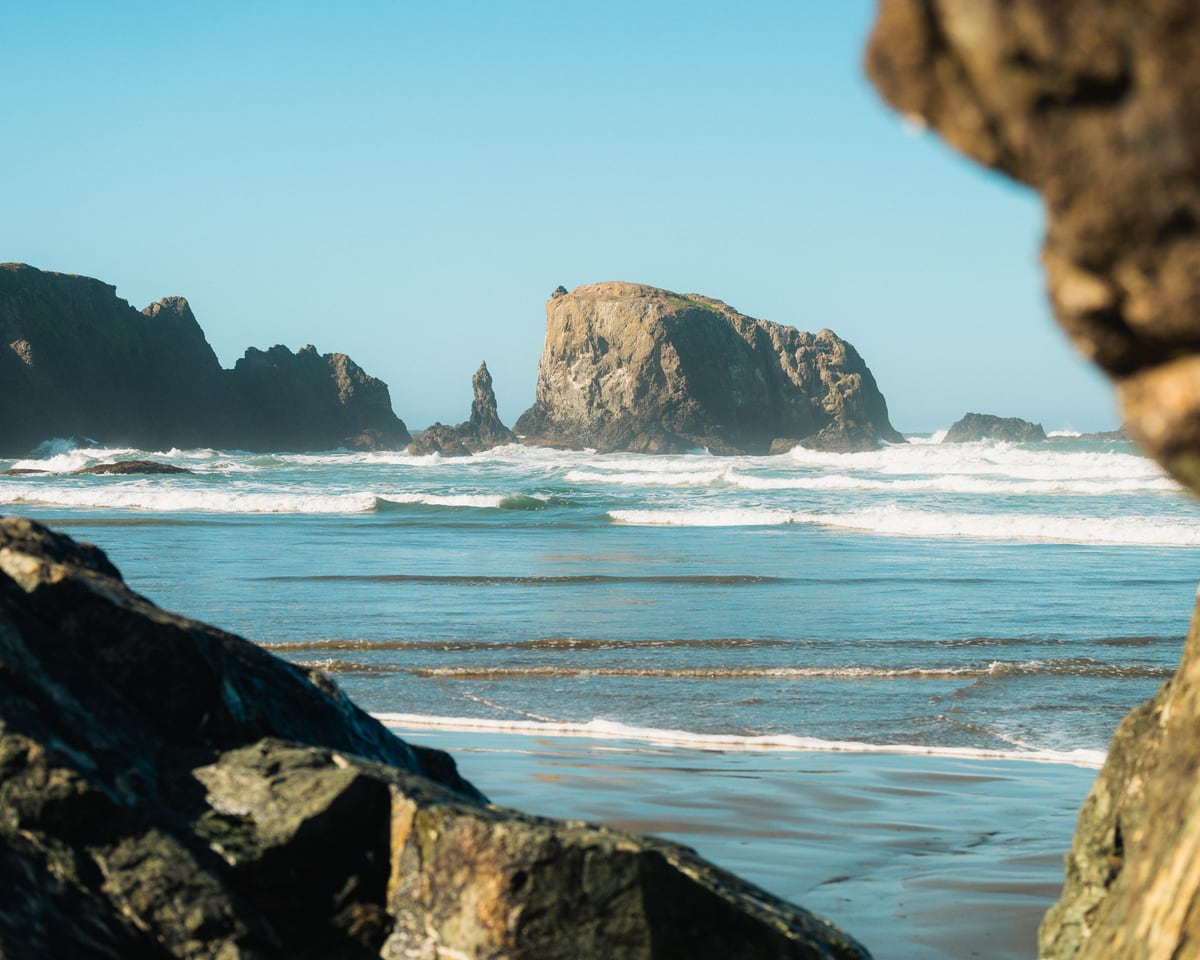
A golden-hour window, a sky and wind read with forecast confidence, and a face-aware terrain render of exactly what the sun lights, annotated with azimuth, elevation, sunset, and peak time, plus a time scrub and access roads (or hikes) ranked by drivability.
Trip Planner
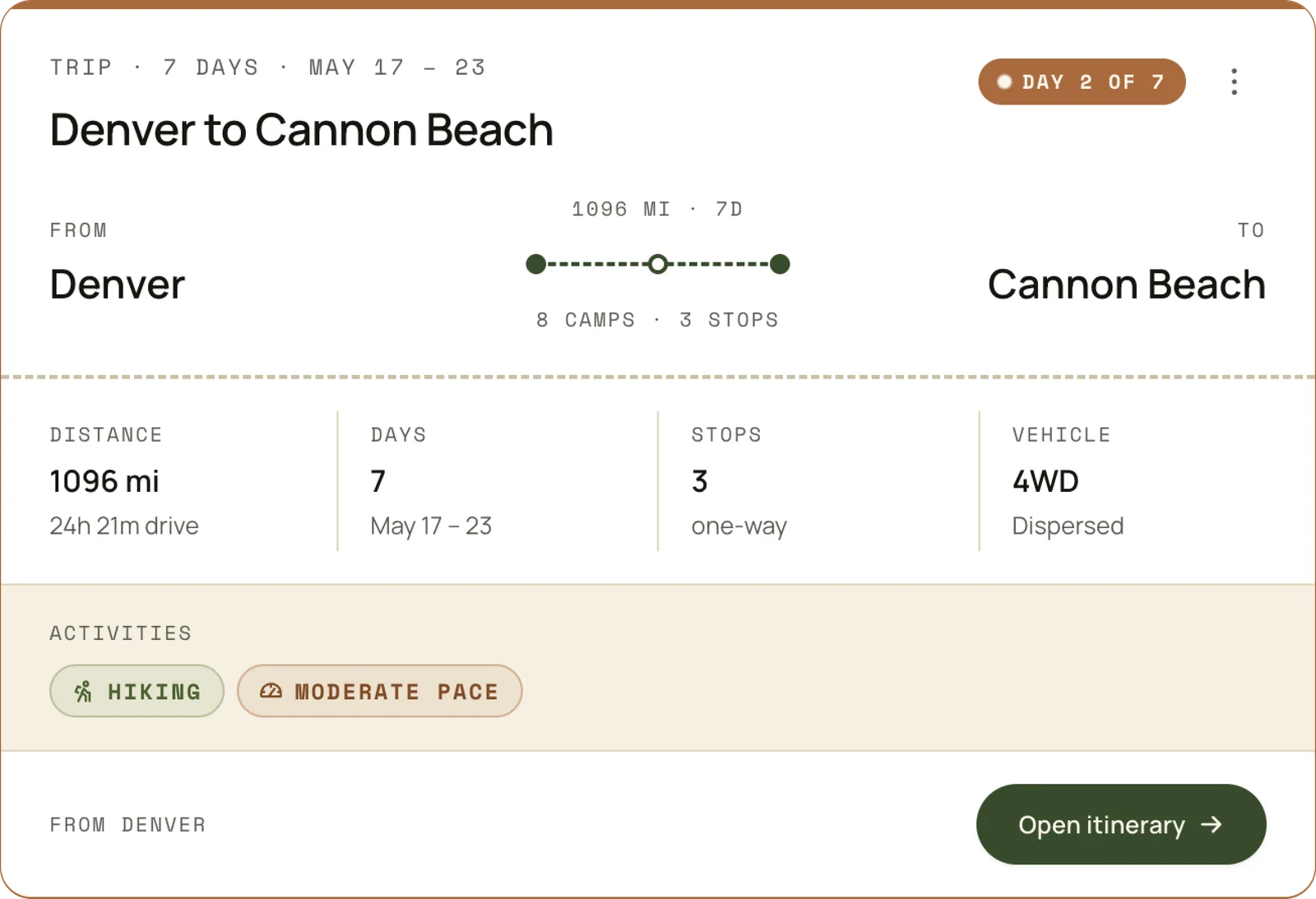
Verified spots become a real, drivable trip. A route summary binds distance and drive time, day count, one-way stops, the vehicle constraint, and pace into a single itinerary, so the plan is something you could leave for tomorrow rather than a list of pins to stitch together yourself.
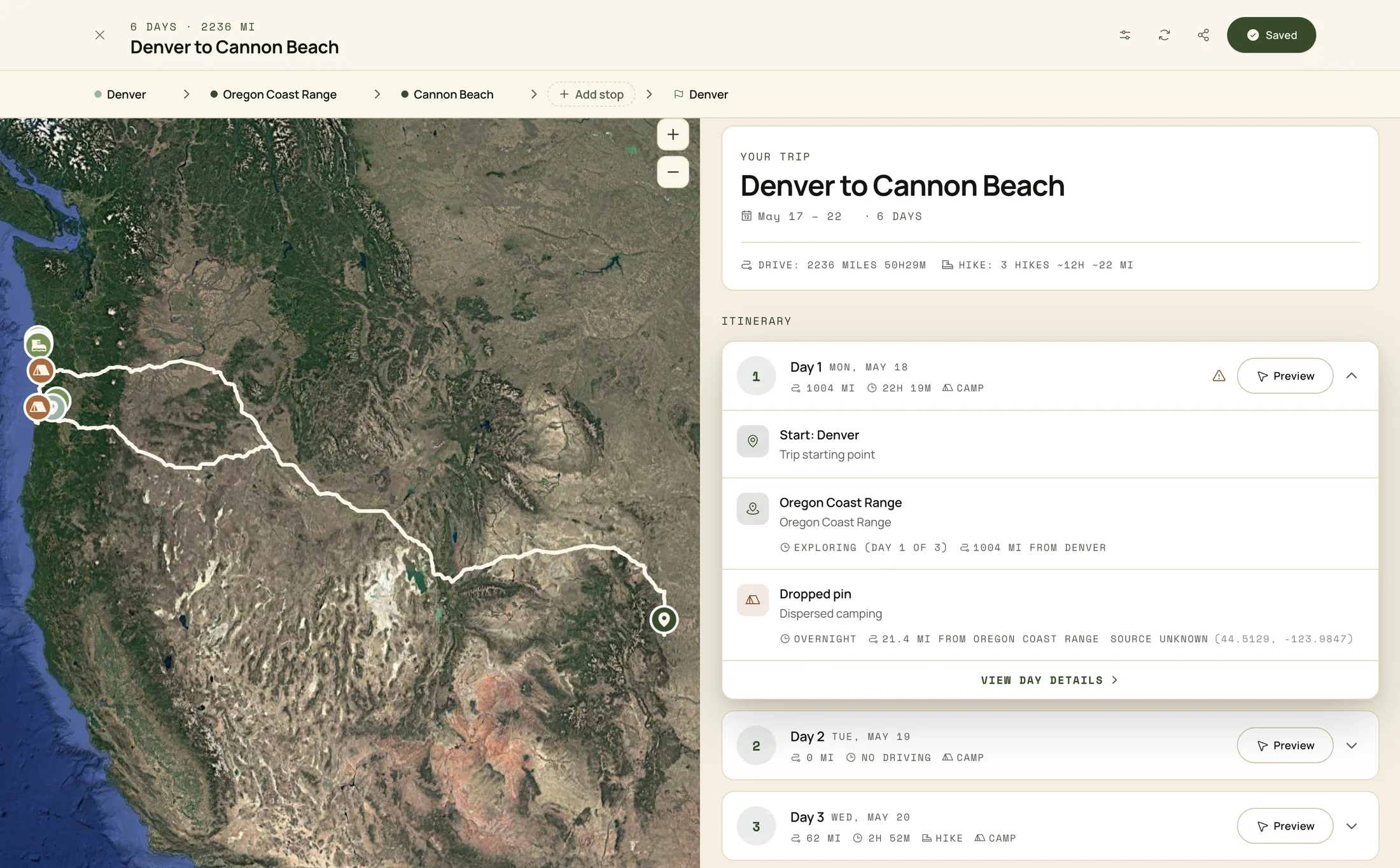
Honest Reflection
What I'd do differently
A few things I learned the hard way and would front-load next time.
01
LLM and agent efficiency
Set up your .md files, use skills where you need them, connect to Notion or something similar to work through backlog items. Just some of the efficiencies I eventually got to after months of prompting into the void in context-less sessions.
02
Local first
In terms of data and infrastructure. I had a local DB setup but didn't use it, and prototyping with large amounts of data like 250k+ rows of road or polygon data will destroy your cloud database. Testing smaller sections of data locally will help avoid large migrations.
03
Resist side features
Focus on building and testing core features and functionality before adding more. Agentic tooling makes almost anything buildable fast, which quietly turns scope into the hard problem. Constraint is a skill.
Outcomes
RoamsWild started as a personal build and turned into a live product I actually use, and that is still being improved daily. Gaining database-schema and SQL knowledge, learning very quickly that multiple API calls will stall performance, and honing in on the constraint and focus needed to build tools that work are some of the main outcomes of how this work has shaped me.
Technical outcomes:
Shipped a working trip planner and algorithmic spot-discovery system on a live Vercel & Supabase stack
Stood up the FastAPI + PostGIS terrain service against USGS 3DEP DEM tiles, with chunked rasters and a feature cache
Refactored a 2,606-line React monolith toward a <300-line primary view using an AI-assisted workflow anchored in PLAN.md
Cut Photo Scout query time from ~50 seconds to ~150 milliseconds by caching prominent features per region
Tradeoffs the build surfaced
Speed vs. focus
Agentic tools make it easy to build fast, which makes it just as easy to build the wrong thing fast.
More signal isn't always more truth
Several scoring inputs sounded impressive but didn't move the result. Simpler models held up better.
Trust needs reasoning, not just answers
A recommendation without an explanation is unusable in a remote environment where the cost of being wrong is real.
The recurring lesson
Building from scratch isn't a tooling problem anymore. It's a judgment problem. AI collapses the cost of building, which puts more weight on knowing what's worth building and how to make it usable.
What's next?
The foundation is live, but behind a waitlist. After the early scope spread, the goal now is depth over surface area: making the existing experiences feel polished before adding new ones.
User preferences and settings Create custom experiences and further tailor the explore content based on vehicle type, hiking capability, etc.
AI/LLM chat feature improvements Cost is a real factor here, and as a personal build, paying per message for chat features is not insignificant.
Tighter glow calibration and access for Photo Scout Field-validating Photo Scout against real sunrises and sunsets across more regions, and giving the user a Calibration control for edge cases.
Points of interest A database (hiking trails, viewpoints, arches, water, dark-sky and historic sites, plus curated hidden gems) pulled from multiple sources and scored, with the goal of feeding these into the trip planner the same way campsites already are.
Consistent and useful rating system across spots Trafficability, useful road ratings, LiDAR analysis on the elevation profile of spots, etc.
Offline-first mode Cached tiles, cached spots, and cached itineraries for remote travel.
Collapsing features into one flow Discovery, itinerary, and Photo Scout / weather should feel like a single decision, not three tabs.
Native application? The world is my oyster.